 Arkime 7
Dashboards, Shark, Featherprint, Shareable Layouts, Choose Your Database (Experimental), PCAPNG, Expression Rules, Capture, Viewer, Multi Viewer, esProxy, WISE, Parliament, Cont3xt, and More
🚀 Download Arkime 7.0.0-rc1 now! 🚀
Arkime 7 is our biggest release ever!
- 56 built-in dashboards ready the moment you upgrade, one for nearly every protocol, built from more than 25 widget types you can mix into your own
- Wireshark style dissection inside Arkime: the new Shark tab runs tshark on any session, right next to the details and packets
- Featherprint passively fingerprints every device on your network and alerts when something new shows up or changes
- No OpenSearch/Elasticsearch required (experimental): keep sessions in ClickHouse and everything else in Postgres or SQLite, or mix and match
- Share everything: column, info field and SPI View layouts, graphs and dashboards can all be shared with users and roles
- Rules that read like searches: capture rules can use full search expressions with math and functions, and the old fields rules run up to 2x faster
- 55 new capture fields, a Zeek style log writer, AF_XDP capture, per protocol timeouts and multiple GeoIP vendors
- A fresh look across all four apps, with ten built in themes plus your own custom theme that follows you everywhere
- Real PCAPNG: read, write and download multiple interfaces and link types
- MISP for WISE and Cont3xt, mTLS everywhere, a View Config page, update checks, Pushover alerts, a CycloneDX SBOM and more
Learn how to upgrade to Arkime 7 now!
Breaking Changes
- Be on Arkime 6.5.0 or later
- If you still have Moloch 2.x or earlier sessions2 indices, run
db.pl <host:port> reindex-sessions2first, the viewer no longer reads them - Run
db.pl <host:port> upgrade - Check your config: more settings are validated at startup, so a value that used to be silently ignored now stops Arkime from starting
Authentication and access
- Set authMode. The
userNameHeadersetting no longer picks the auth mode, and withoutauthModedefaults to digest. Header auth needsauthMode=header. - The dbAdmin role replaces the
esAdminUserssetting. Grant it withdb.pl <host:port> users-update '<userId glob>' --addRole dbAdmin, and pair it with arkimeUser, which the viewer needs for any access. - The
userAutoCreateTmplsetting is removed. Use the [user-auto-create] section. - The wiseService no longer makes a random config pin code. Use
--webcode <code>or each user's own TOTP code.
Data and storage
- Layouts moved to shareables. Session columns, info field config and SPI View layouts moved from the user record to the shareables index so they can be shared.
db.pl upgradecopies them for you (or rundb.pl <host:port> shareables-import all); the originals stay, so Arkime 6 keeps working. - No lmdb:// or redis:// for users, cont3xt, Parliament or notifiers. Use sqlite:// or postgres://, there is no migration. Redis and LMDB still work for caches and config.
- Old indices are no longer read. sessions2 from before Moloch 3.
- Parliament no longer imports pre Arkime 5 parliament.json files. Upgrade with Arkime 6.x first
simpleDEKEncodingis removed. The DEK is always encrypted with aes-256-gcm.
Capture
- More, smaller sessions for lldp, xid, isis, esis, igmp and pim. They used to record all their traffic as one session per capture node, now there is a session per talker pair: by src/dst mac for the ethernet protocols and by src/dst ip for igmp and pim.
_flipSrcDstflips the whole session. It used to swap only the ips and ports; now packets, bytes, databytes, payload8, mac, oui, dscp, ttl, tcp seq/state and zero window counts swap too.offlineFilenameRegexmatches .pcapng. The default used to match only .pcap and .cap.- Stricter settings. Booleans must be true or false (not 0, 1 or False),
rotateIndexmust be one capture accepts,freeSpaceGmust be a number or a percentage, and the hunt and tshark limits, timeouts and ports must be numbers in range.
AWS and S3
- The s3 writer finds credentials like the readers. s3AccessKeyId, then AWS_ACCESS_KEY_ID, ~/.aws credentials/config (--profile), EKS, ECS and finally instance metadata, so a host with an instance role and AWS env variables or ~/.aws files now uses those. s3UseECSEnv is no longer needed.
awsUseTokenForMetadatadefaults to true. The s3/sqs readers use IMDSv2 like the writer (s3UseTokenForMetadata still works); set it to false on hosts without IMDSv2.s3UseHttpapplies to the s3/sqs readers when s3Host is set, they always used https before.
View a detailed list of all the changes and download Arkime 7.0.0-rc1 now!
Arkime Dashboards
The Arkime tab is now a full dashboard builder, and Arkime 7 ships with 56 built-in dashboards, up from none in Arkime 6. There is an Overview and a Connections dashboard, one for nearly every protocol from ADB to WebSocket, and Analysis dashboards for Certificates, Databases, Files, Hosts, Multicast, OT, Routing, Security, Software and Tunnels. The suricata and zeekintel plugins each add their own, and the JA4+ plugin comes with one too.Dashboards are made from more than 25 widget types: timelines, area, bar, combo, scatter, pie, treemap, sankey, mosaic, waffle, matrix, heatmap, time of day, tag cloud, maps, gauges, metrics with trend lines, connection graphs and trees, session lists, Markdown notes and more. Filter controls and
${variables} let one dashboard answer many questions, widgets can compare to the day or week before, show percentiles, and turn amber or red at warning and critical levels.
Dashboards can be organized into folders, shared with users and roles, set as your default, opened by url, refreshed on a timer and saved as a PDF, and every widget can be downloaded as a PNG, or as a CSV for tables. Drop your own exported dashboards into
/opt/arkime/etc/dashboards (dashboardsDir) and they show up for everyone, no restart needed, and dashboardMaxQueryDays limits how much time a dashboard may search.
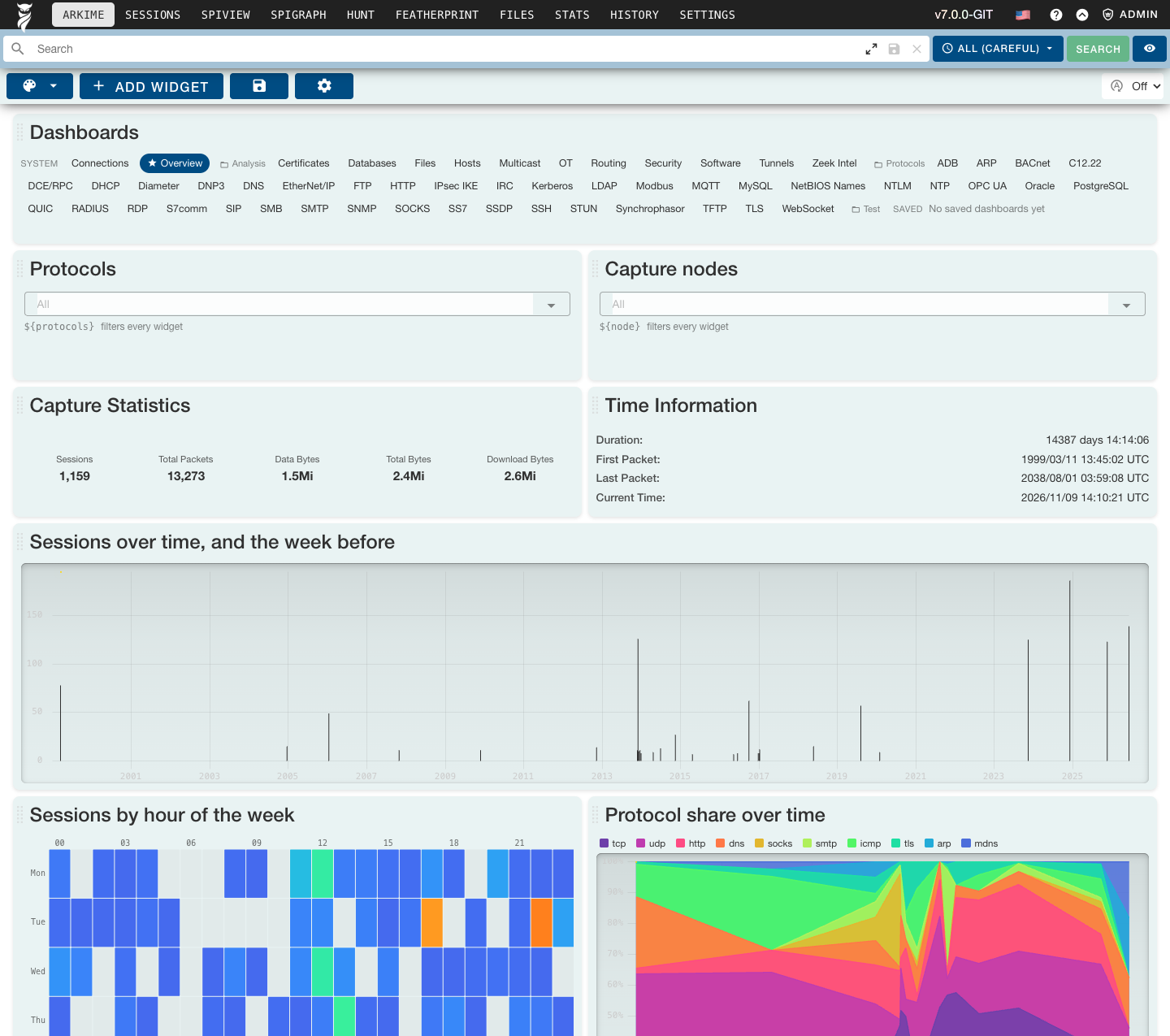
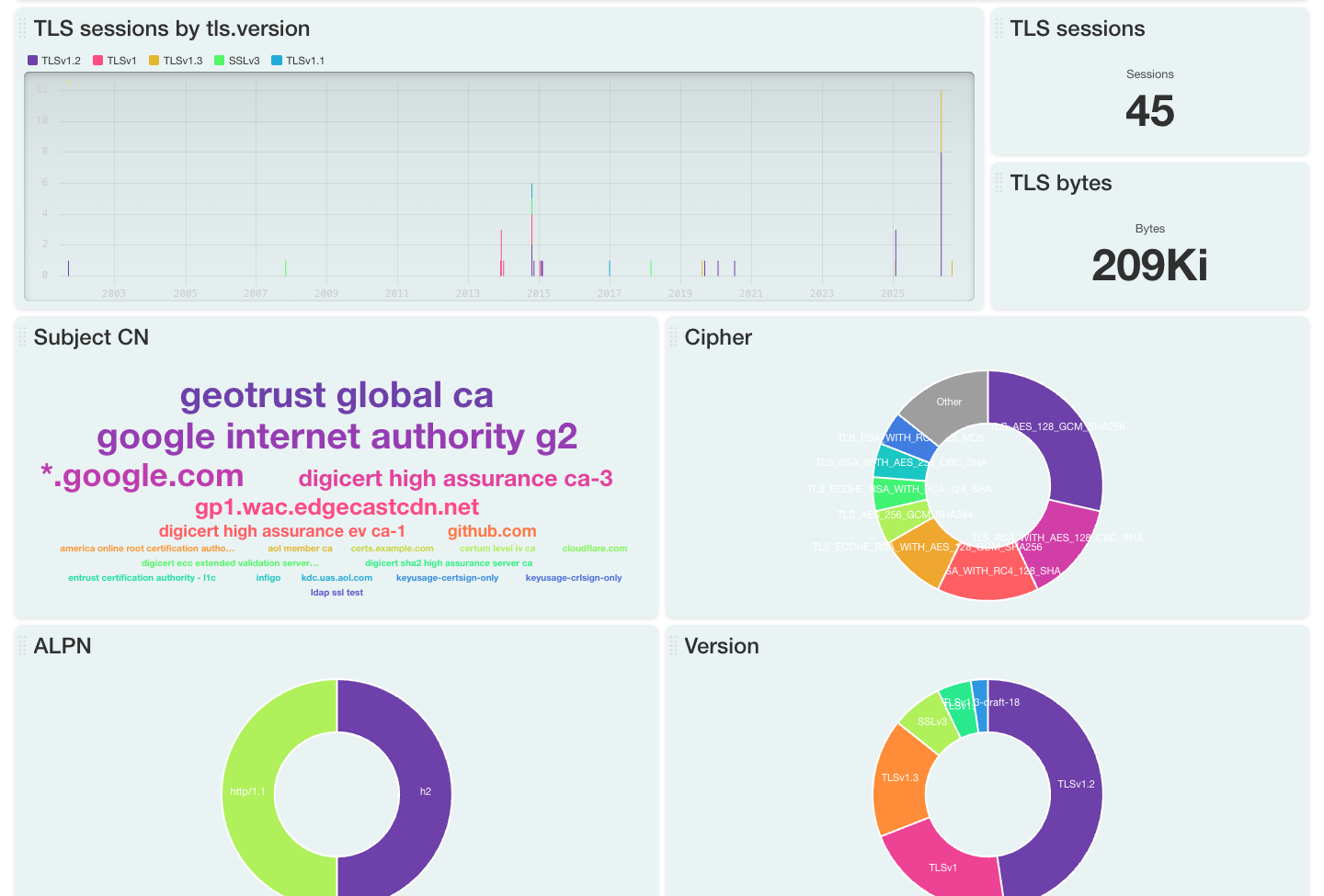
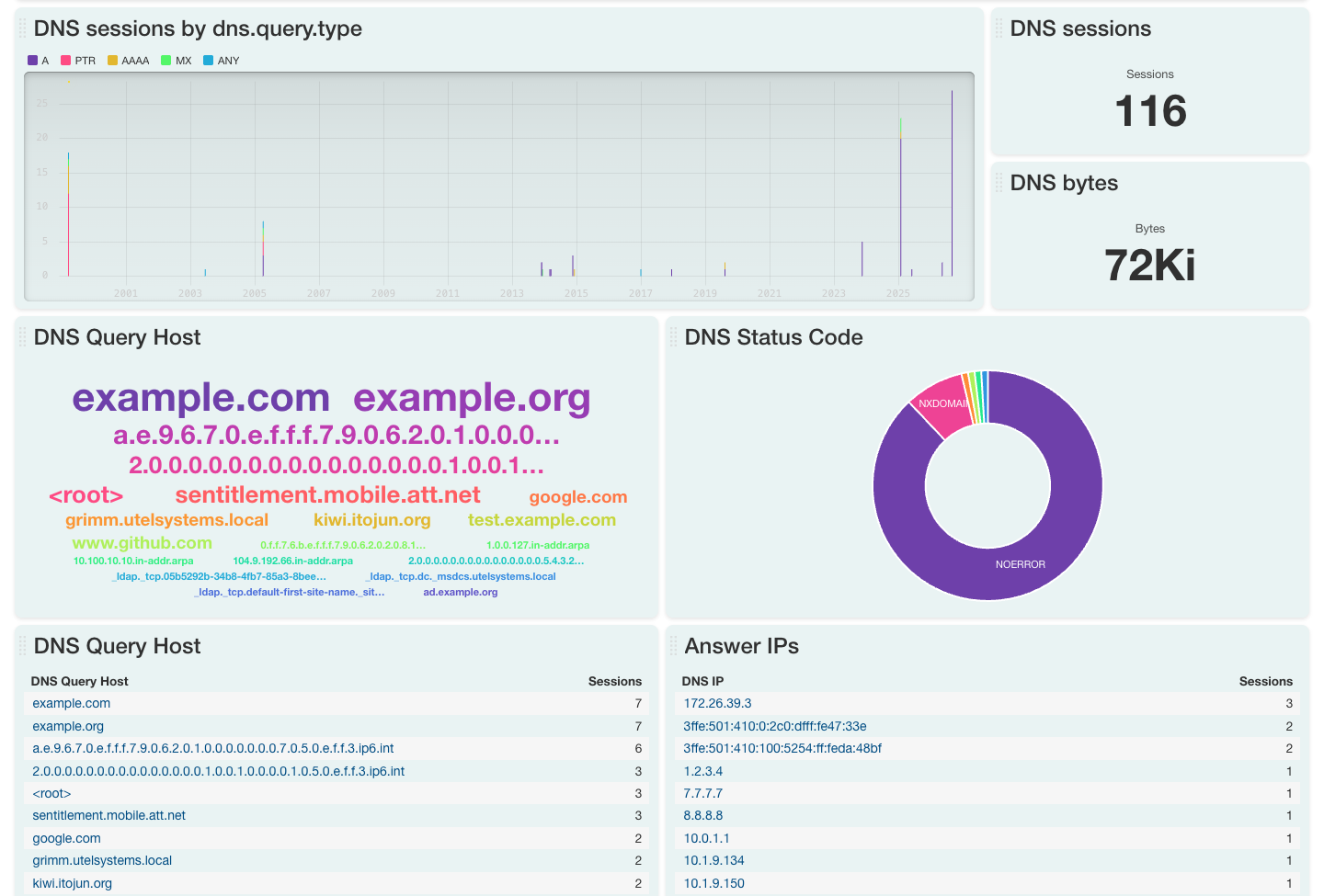
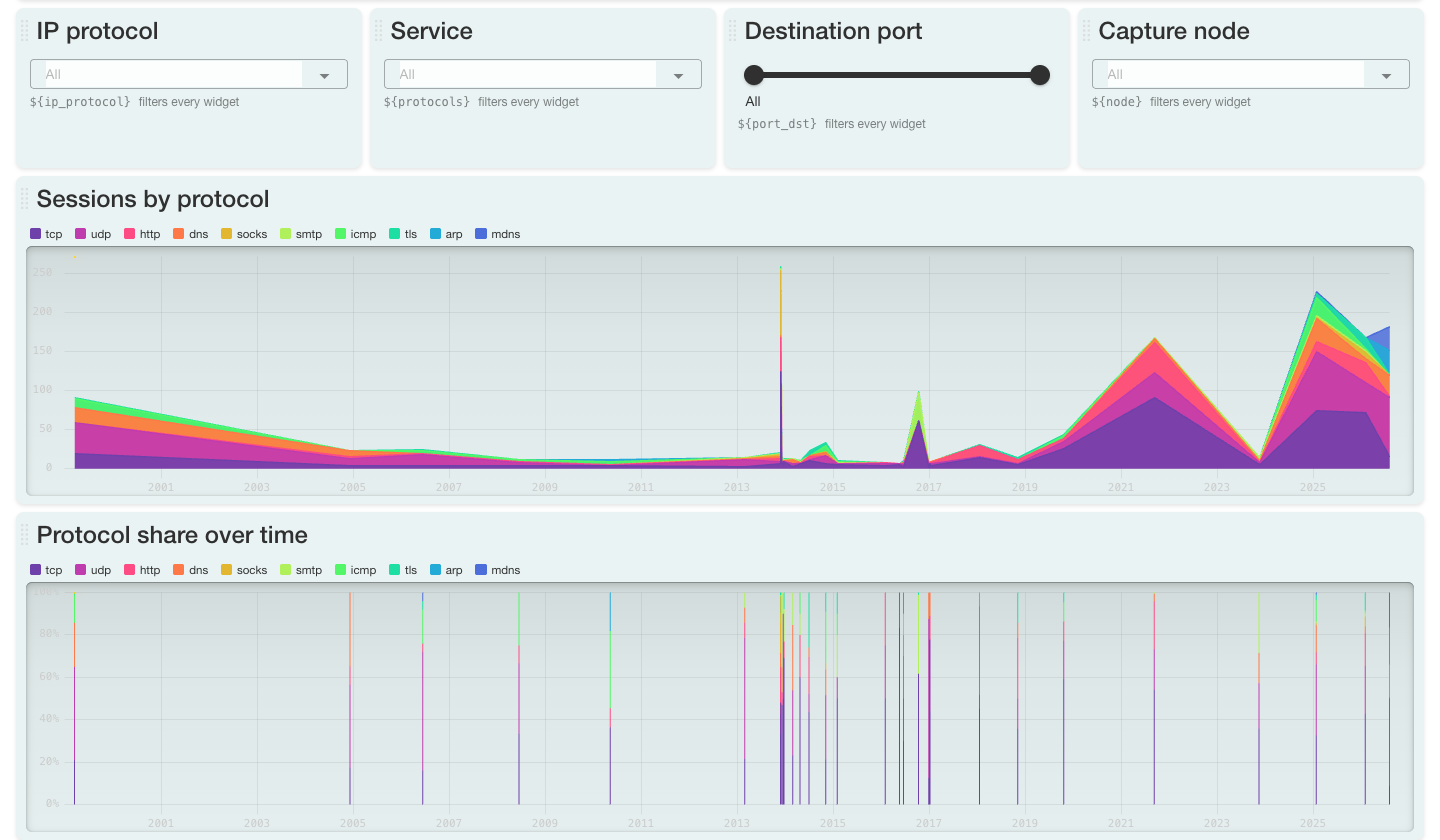
Shark
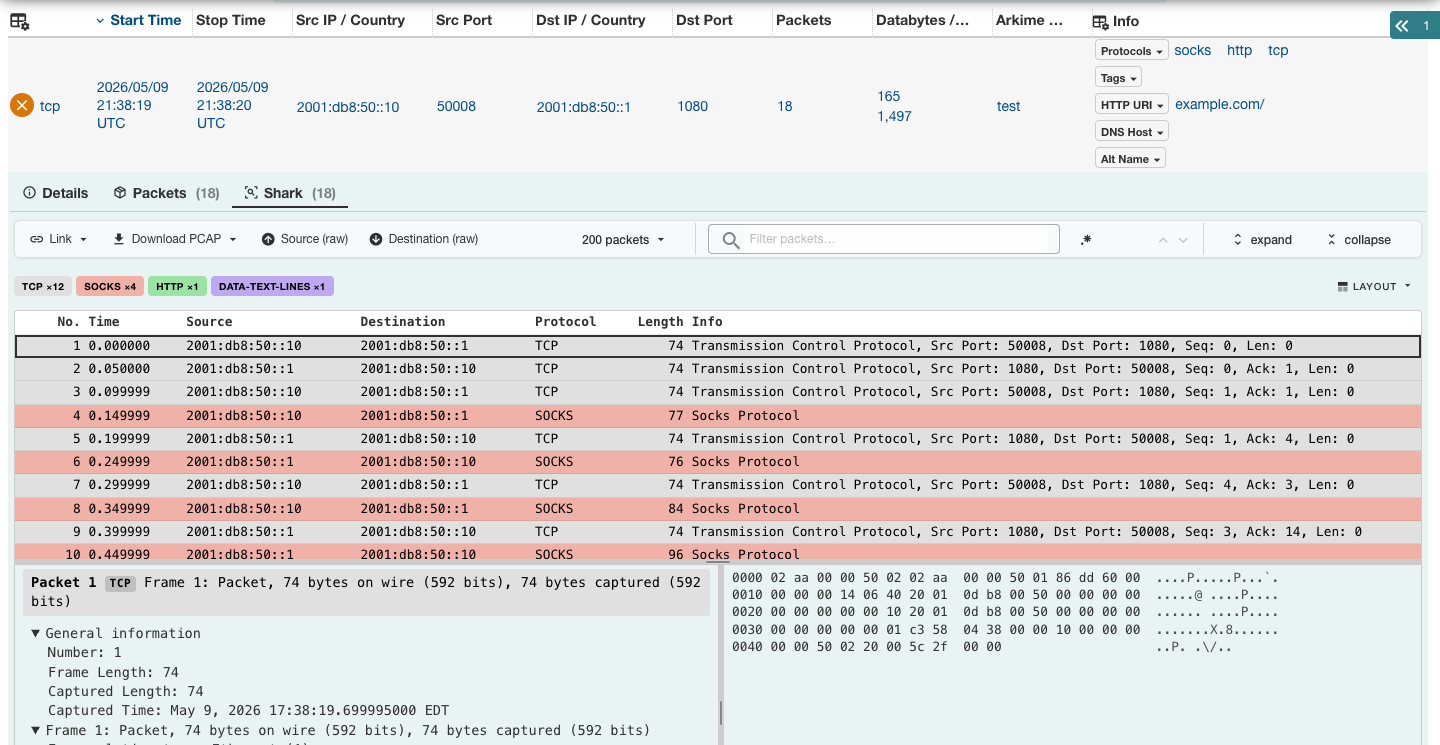
Wireshark style dissection, without leaving Arkime. Session detail is now three tabs, Details, Packets and the new Shark tab, which runs tshark on the session and shows the packet list, the full protocol tree and the bytes side by side. Filter packets, color them by protocol, expand or collapse the tree, and jump between matches. Session detail also gained find in content, and the Session Detail Tab setting picks which tab opens first. Requires tshark 4.6.4 or later, see tsharkPath.Featherprint
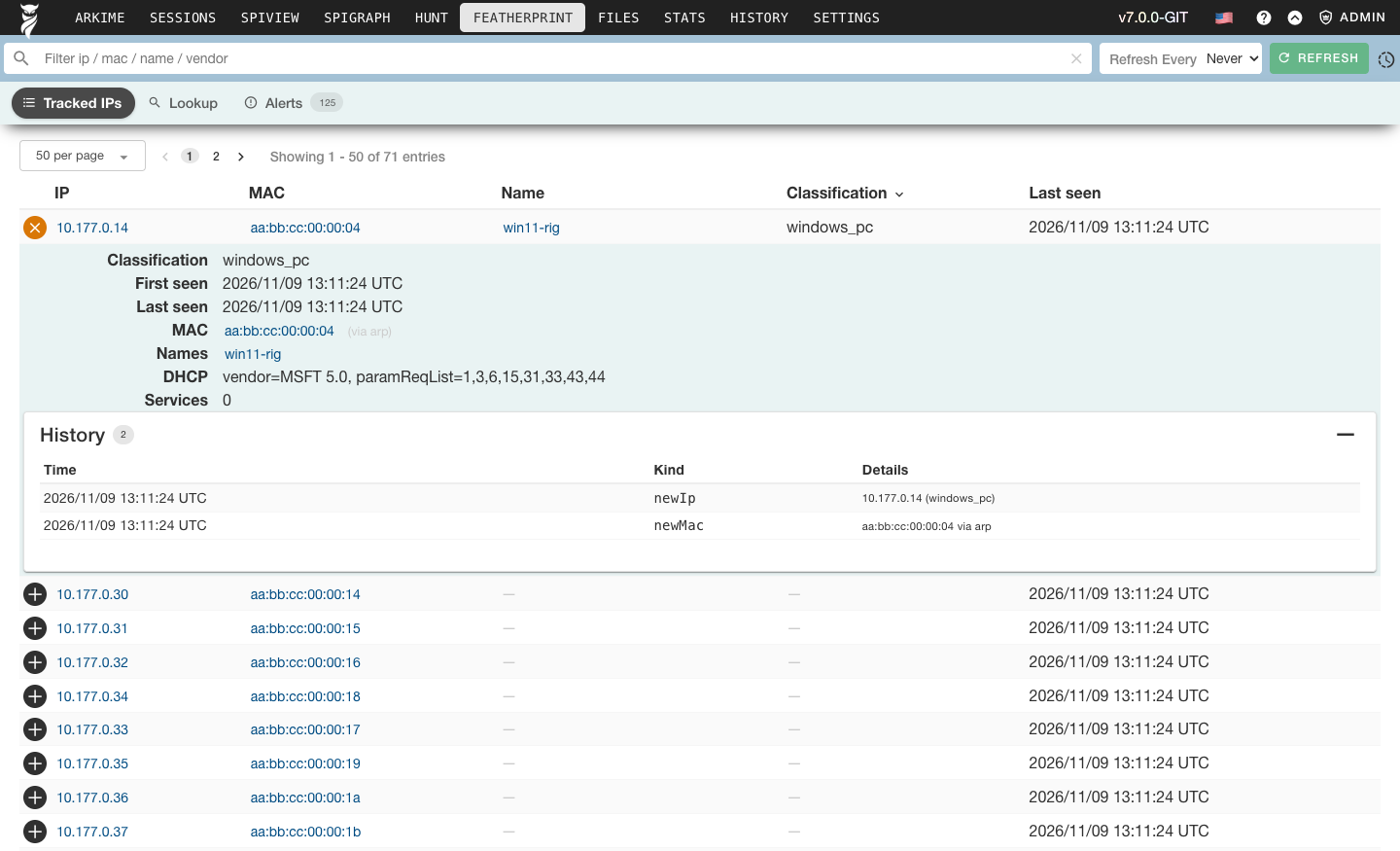
Know every device on your network. Featherprint passively fingerprints devices from the sessions Arkime already saves, using ARP, DHCP, DNS/mDNS, NBNS and SSDP, no extra sensors or scanning. For each subnet you watch it keeps a record per device: MAC and its history, hostnames, services, DHCP and SSDP attributes, and a rule-based classification like printer, smart TV or Raspberry Pi. It records a change history and raises alerts when a new device appears or an existing one changes, and alerts can be acknowledged by the whole team, controlled by featherprintAckRoles. Any IP can also be fingerprinted on demand. Configure the ranges to watch in [featherprint-subnet] and add your own classifier rules in/opt/arkime/etc, see featherprintRulesFiles.
Shareable Layouts
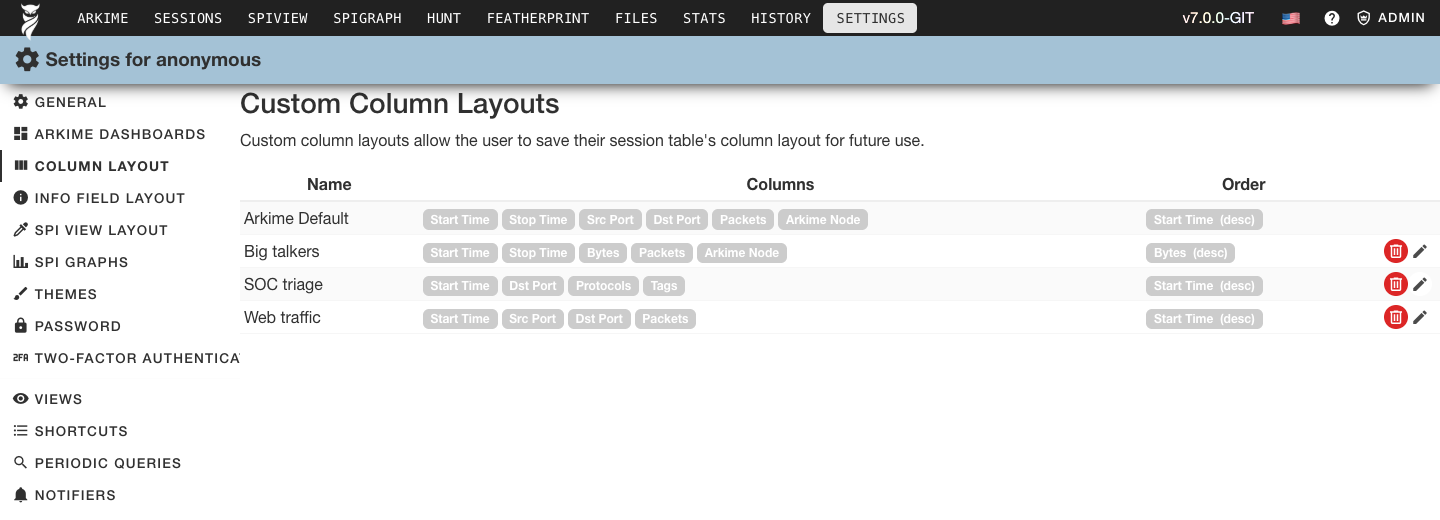
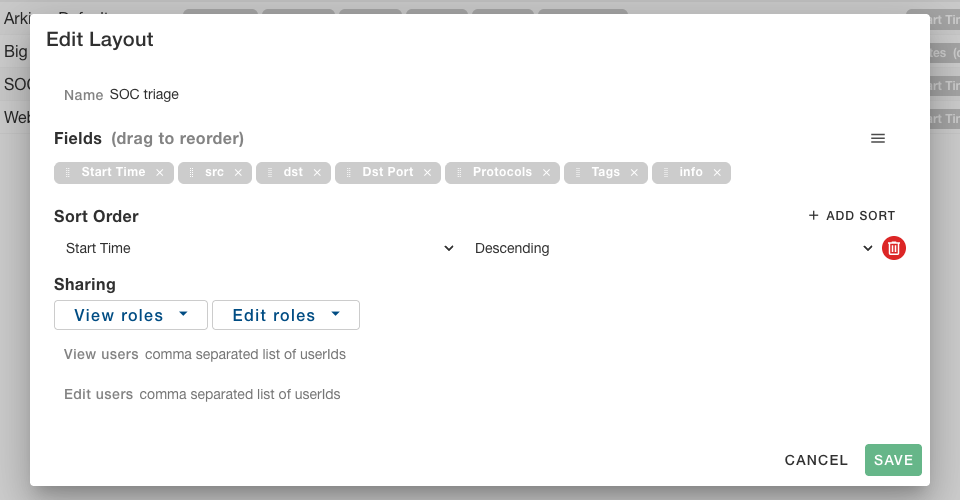
Build a layout once and give it to your whole team. Session column, info field and SPI View layouts can now be created, edited and shared from the Settings page, with separate view and edit access for users and roles. SPI Graph graphs can be saved and shared the same way, and added to a dashboard as a widget. A Shareables settings tab lets you rename, re-share or delete anything you have shared.db.pl upgrade moves your existing layouts over for you.
Choose Your Database Experimental
- Sessions: OpenSearch/Elasticsearch or ClickHouse 26.3+, set with sessionsDbUrl
- Cluster (stats, files, fields, hunts, history and Featherprint): OpenSearch/Elasticsearch or Postgres, set with dbUrl
- Users: OpenSearch/Elasticsearch, Postgres or SQLite, set with usersDbUrl
- Cont3xt: OpenSearch/Elasticsearch, Postgres or SQLite, set with cont3xt's dbUrl
[tee] can copy every session into ClickHouse while your viewers keep reading OpenSearch/Elasticsearch.
The new dbPlugins setting lets anyone add more, the source includes MongoDB and MySQL plugins in capture/plugins.
Existing installs change nothing, with none of the new settings everything stays in OpenSearch/Elasticsearch.
[default]
sessionsDbUrl=clickhouse://arkime:password@ch.example.com:8123
dbUrl=postgres://arkime:password@pg.example.com/arkimePCAPNG
Much improved pcapng support: capture reads and writes files with multiple interfaces (up to 255) and different link types, and keeps writing pcapng when the input was pcapng. Sessions and exports can now be downloaded as PCAPNG, which keeps every interface and link type. A PCAP download that would mix link types is refused with a message to use PCAPNG instead.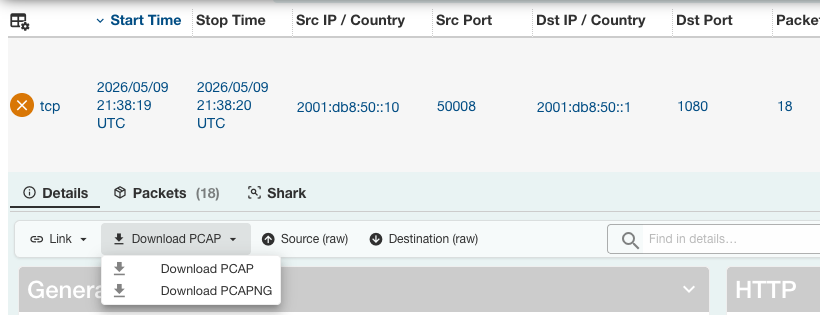
Expression Rules
Capture rules can now use anexpression instead of fields or bpf, using a syntax similar to the Sessions search bar plus math and functions:
&&, ||, ! and parentheses, lists, wildcards, regex, cidrs, comparisons, and functions like count(), lower(), isPrivate(), any() and bpf().
Expressions are compiled to bytecode when the rules file loads, mistakes are reported with the line and column, and log: true logs which conditions matched and their values.
Existing fields and bpf rules keep working unchanged in the same version: 1 files, and fields rules now run on the same engine, matching up to 2x faster.
See Rules Format for the details and the rules gallery for examples.
  - name: "Odd TLS"
    when: "afterClassify"
    log: true
    expression: >
      protocols == tls
      && port.dst != [443, 8443]
      && !(ip.dst == [10.0.0.0/8, 192.168.0.0/16])
    ops:
      tags: "odd-tls"
Capture
- 55 new fields, including TLS ALPN, groups and alerts, certificate SHA256, key length and signature algorithm, the SSH key exchange, host key, cipher and MAC, NTLM computer and domain names, HTTP body lengths, Kerberos message types, LDAP operations and results, SOCKS status and bound address, and the full NTP header
- SMB session setup responses are decoded so the NTLM challenge is seen, SIP is classified on every request method, and sessions carried in AH, ERSPAN, UDP encapsulated ESP and TCAP are tagged
- New zeeklog plugin writes Zeek style conn, dns, http, ssl, x509, files and more log files from the sessions Arkime sees
- New xdp pcapReadMethod reads packets with AF_XDP sockets, one socket and thread per nic receive queue, see xdp settings
- The new [protocol-settings] section sets the idle, save, closing, packet and stream limits per protocol, eg
tcp=idle:600;closing:5 - GeoIP from MaxMind GeoLite2/GeoIP2, GeoOpen, ipinfo or db-ip, set with geoFile and geoASNFile
- rulesFiles can be directories that are watched for new and removed files, and a
default.rules.ymlis now installed and kept up to date for you - Writes sessions directly to ClickHouse and the cluster data to Postgres, see Choose Your Database
- Faster session hash lookups and dedup, and session and dedup hashing now use a random key so traffic can't be crafted to overload one packet thread
- A new
perf-statscommand socket command dumps queue depths, hash usage and outstanding requests for performance debugging - The s3 writer and s3/sqs readers support EKS IRSA and Pod Identity credentials, so EKS pods no longer need instance metadata access
- Capture shuts down cleanly, the offline and scheme readers stop mid file on SIGINT and log what was skipped
Viewer
- SPI Graph gained bar, area, combo, scatter, matrix, matrix heatmap, mosaic, waffle, tag cloud, time of day and connection tree graphs, and Connections is now an SPI Graph graph type
- SPI Graph has a settings dialog with every option a dashboard widget has: metrics and aggregations, percentiles, warning and critical levels, bucket ranges, sort and refresh
- Saved graphs: save, share and load an SPI Graph graph, add it to a dashboard as a widget, or save any dashboard widget as a graph
- New Admin menu for Users, Roles, Banner and ES Admin, which moved to
/esadminand now needs the dbAdmin role - Admins can set a banner for each app, with an optional expiry
- A prettier Stats page with resource meters and a capture centric node dashboard
- Faster charts: the timeline uses uPlot and the world map uses D3
- The time controls now live in the search row, and help notes and per page tips replace the welcome message
- New Start Page and Session Detail Tab settings pick where the viewer opens and which session detail tab shows first
- Two-factor setup has its own settings tab, so it works when the password page is disabled
Multi Viewer
One multi viewer can now search OpenSearch/Elasticsearch and ClickHouse clusters at the same time. Each multiESNodes entry can set its ownsessionsDbUrl, sessionsDbPrefix, dbUrl and dbPrefix,
and the results from every cluster are merged together in Sessions, SPI View, SPI Graph and the dashboards, no matter where each cluster keeps its sessions.
Bring up a ClickHouse cluster next to your existing OpenSearch/Elasticsearch one and your users see both in one place (mixing in ClickHouse is experimental).
A cluster with both its sessions and cluster databases off OpenSearch/Elasticsearch needs none, so a multi viewer can run with no OpenSearch/Elasticsearch at all.
[multi-viewer]
multiESNodes=https://es1.example.com:9200,name:es1,prefix:arkime;https://es2.example.com:9200,name:ch1,prefix:arkime,sessionsDbUrl:clickhouse://ch.example.com:8123esProxy
esProxy can now write your sessions to OpenSearch/Elasticsearch and ClickHouse at the same time. SetsessionsDbUrl in its [tee] section and every session the sensors send through esProxy is also written to ClickHouse (or a dbPlugins sessions database), the same way capture writes them there, and hunt updates from sensor viewers are copied too.
Your sensors and viewers keep using OpenSearch/Elasticsearch while ClickHouse fills up beside it, so you can try ClickHouse with real traffic, compare the two, and then point a viewer or a multi viewer cluster at it.
Sessions are batched, and a batch that fails is retried one sensor at a time so one sensor's bad data can't drop everyone else's.
[default]
elasticsearch=https://es.example.com:9200

[tee]
sessionsDbUrl=clickhouse://arkime:password@ch.example.com:8123/opt/arkime/db/ch.pl <url> init.
The original [tee] elasticsearch setting still copies everything to a second OpenSearch/Elasticsearch cluster.
WISE
- New MISP source that either bulk loads attributes on a schedule or looks up each item, with multiple
[misp:<name>]instances - The urlapi, url, elasticsearch, elasticsearchfile and misp sources can verify servers with a private CA and present a client certificate (mTLS)
- The users OpenSearch/Elasticsearch connection supports client certificates with esClientKey/esClientCert
- The config page no longer uses a random pin code, use
--webcodeor your own TOTP code
Parliament
- The new look and themes, shared with the other apps
- Parliament and its issues are stored in the users database, which can now be Postgres or SQLite as well as OpenSearch/Elasticsearch
- Clusters without OpenSearch/Elasticsearch show their ClickHouse, Postgres or SQLite health
- Issue names and messages are shown in your chosen language, and the Issues page searches and sorts on the translated text
- New Pushover notifier with priorities, including emergency alerts that repeat until acknowledged, sounds, devices and optional end-to-end encryption
Cont3xt
- New MISP integration, with multiple
[misp:<name>]instances - A redesigned integrations settings tab, and integration secrets are always masked
- The urlapi, elasticsearch, arkime, misp, csv and json integrations can verify servers with a private CA and present a client certificate (mTLS), see the common integration settings
- The cont3xt data can live in Postgres or SQLite, see dbUrl
And More
- All four apps have a new look built on Vuetify, with ten built in themes plus a shareable custom theme, and your choice follows you between the apps
- Icons switched to Material Design Icons
- A new admin only View Config page in every app, controlled by viewConfigMode, shows the config it is really running with, including command line overrides and environment settings
- A "newer release available" check in every app's version menu, controlled by checkForUpdates, which only ever sends the major version
- Releases include a CycloneDX SBOM, and there are new Alpine 3.24, Amazon Linux 2027 and Fedora 45 packages
- The rpm and deb packages use the OS libraries instead of bundling static copies
